Scam alert · 24 Nov 2026
“Your account broke the rules”: every tell in one WhatsApp scam
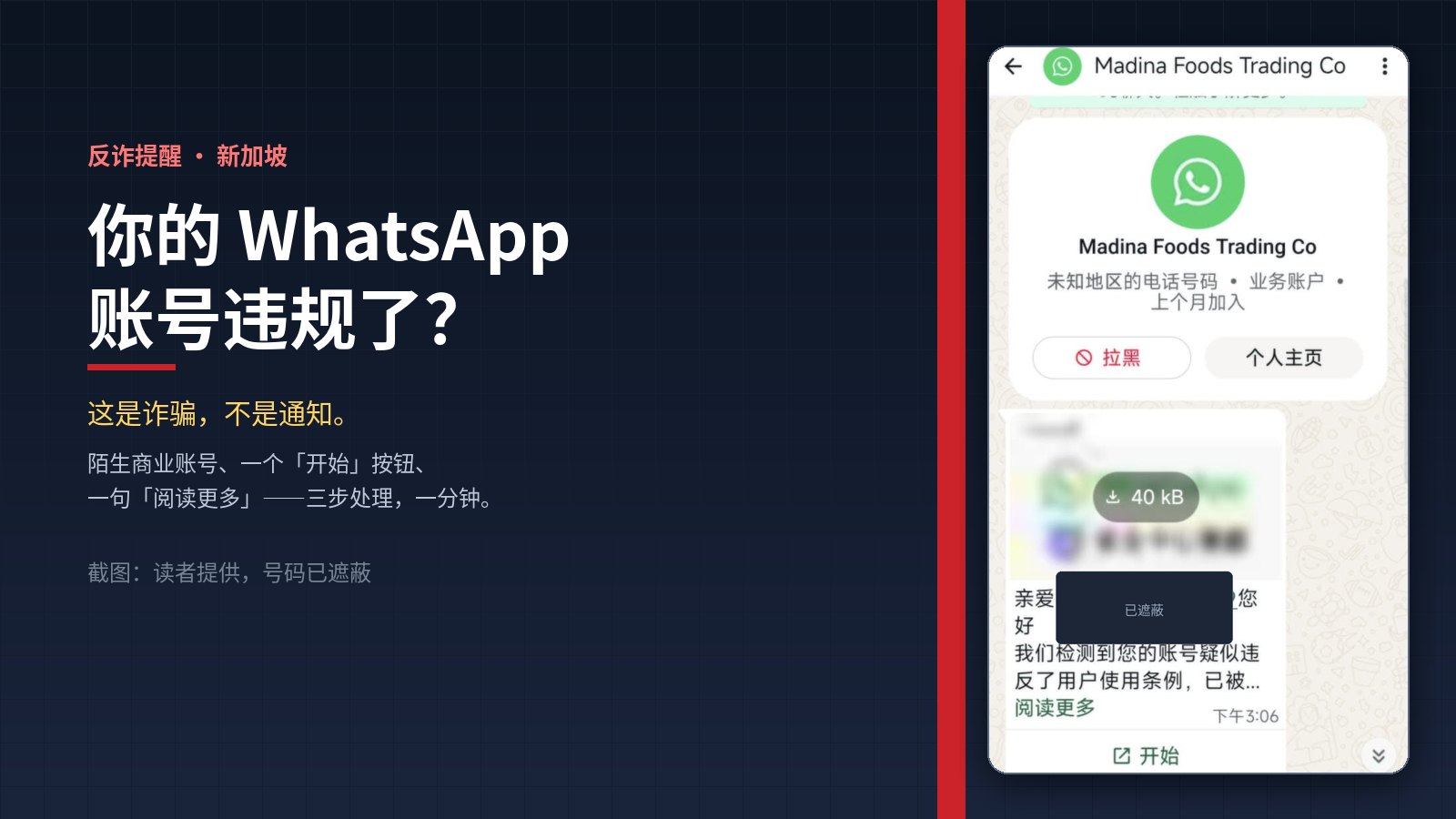
An unknown business account, a “Start” button, a “Read more” link — the screenshot is a real message received by a reader, with the number redacted.
One message, three scripts
Start with the screenshot
The message comes from an account called “Madina Foods Trading Co”: an unknown-region number, a business account, joined last month. The text is in Chinese, opens with the recipient’s own number, then says the account has breached the terms of use. Below it: “Read more”, and below that a “Start” button.
Four tells you can spot at a glance
First, the sender is wrong. WhatsApp does not send account notices from a stranger’s food-trading business account, and certainly not one that “joined last month”. Official notices appear inside the app — Settings → Account, or as in-chat system messages.
Second, the script is a template. Quoting your own number, manufacturing urgency around “breach” and “suspension”, then offering a “Read more” to click — that is the standard three-part phishing script, identical whether it wears a bank, a courier or a tax office. A real violation does not warn you that it is “suspected”; functions simply get limited.
Third, the button is the trap. “Start” does not open WhatsApp settings; it opens a fake login page that asks for your phone number and the six-digit code. Hand that code over and the other side can log into your account.
Fourth, the attachment is suspect. The 40 kB file in the screenshot may be an image or an installer disguised as a notice. Never download an attachment from a stranger.
How the script works: fear, click, code
The goal is never to get you to “cooperate with an investigation”. It is to obtain one of three things: the verification code, your password, or an invitation to install a remote-control app. Any one of them and your WhatsApp can be used to borrow money from your contacts, or to register other accounts.
Three steps, one minute
- Do not tap “Read more” or “Start”, and do not download the attachment. If you already tapped, enter nothing and close the page.
- Long-press the message → Report → Block. No reply, no explanation needed.
- Check your account: WhatsApp → Settings → Account → Linked devices, and log out anything you do not recognise; then turn on Two-step verification with a six-digit PIN.
The one-line test
Any message that comes from a stranger, pushes a deadline, and asks you to click or hand over a code is a scam. If something were really wrong, you would see it when you open the app yourself. Emergencies that only exist inside a message from a stranger do not exist.
Forward this to family and staff: “Never give the code, never tap the link, check the account yourself.” Three lines that stop most of these messages.
Note: the screenshot was supplied by a reader and the recipient’s number has been redacted. The guidance follows WhatsApp’s own help-centre pages on account security, two-step verification and reporting; no unverified statistics are cited.
About us
Singapore Global International: international education and local settling-in.